← Journal · · Deep dive
Tensorizing, or fast loading of model weights into GPU
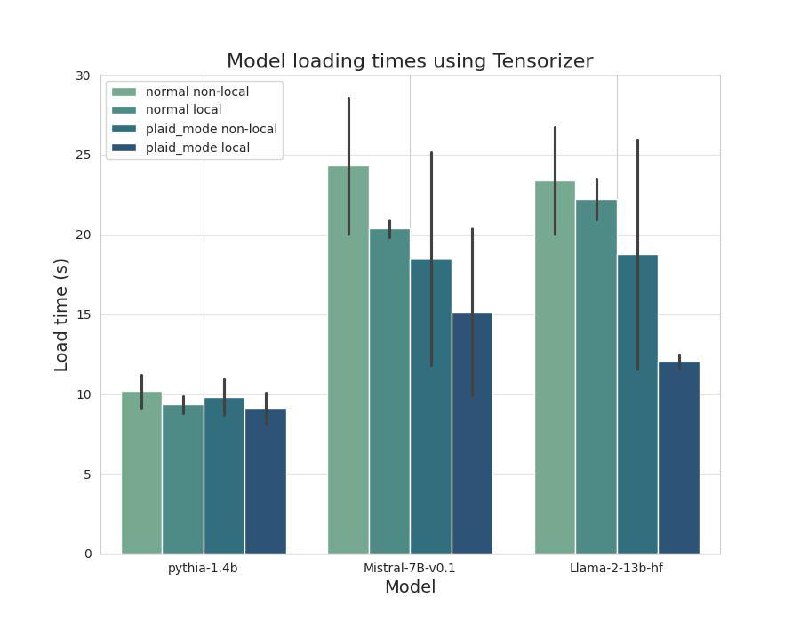
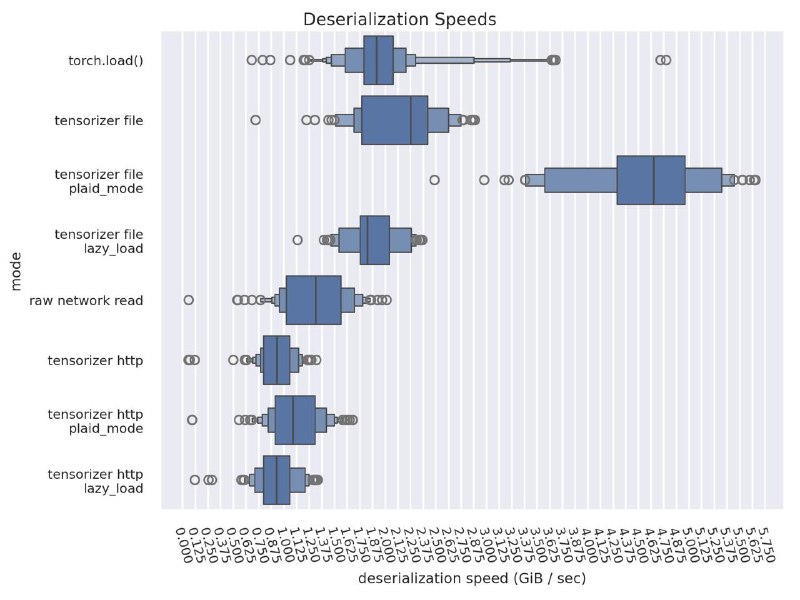
Let's dig deeper into what tensorizing is - a way of serializing and deserializing model weights that cuts down the time to load weights into the GPU. It also lets you store weights in S3, add encryption, reduce inference startup time, and reduce CPU load.
Origins - the CoreWeave project
How it was added to vLLM
How to use it in vLLM
Example script for serialization/deserialization. The comments in that script have detailed instructions on how to use it.
Test results I measured the time to load weights from a local path into the GPU during vLLM startup
Qwen3-8b A100 40gb x1 weights size 15.2683 GiB tensorize vs default 5.435905 sec vs 34.538318 sec
example vLLM config
{ "model":"Qwen/Qwen3-8B", "load_format": "tensorizer", "model_loader_extra_config": {"tensorizer_uri": "/root/models/ser-qwen-from-local/vllm/qwen_hf/v1/model.tensors"} }
Difference: 7x
Qwen3-32b A100 40gb x2 with tensor-parallel-size 2 weights size 30.5855 GiB tensorize vs default 118.667568 sec vs 307.285575 sec
example vLLM config
{ "model":"Qwen/Qwen3-32B", "load_format": "tensorizer", "model_loader_extra_config": { "tensorizer_uri": "/root/models/ser-qwen-32-from-local/vllm/qwen_32/v1/model-rank-%03d.tensors" }, "tensor_parallel_size": 2, "disable_log_requests": "true", "gpu_memory_utilization": 0.9, "max_model_len": 5024 }
Difference: 3x
Weights genuinely load several times faster. If you need to cut down GPU weight loading time, I recommend taking a closer look at this approach!