← Journal · · Deep dive
Custom forms in JupyterHub
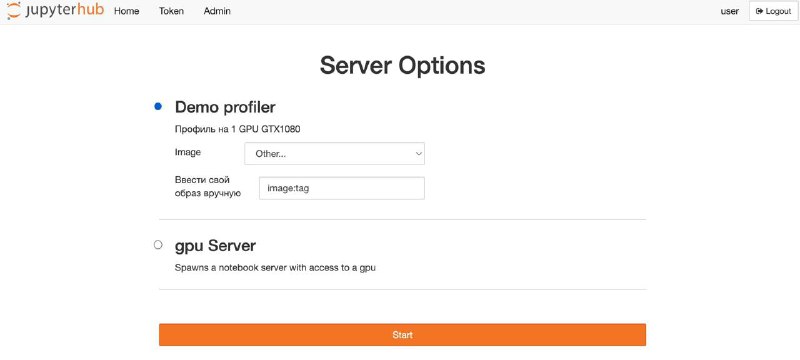
Hi! Right now I ran into a task: how to make a custom form in JupyterHub for creating instances. For now it just needs to let you type in an image name by hand, or pick a default one. At first I wanted to do it following this great article by Sasha Egorov (he also has a cool channel about MLOps, by the way) using jinja2 templates, but then I stumbled on a slightly different approach...
If you're using the JupyterHub Helm chart version 3.8.8 (there might be support in lower versions too, you need kubespawner 6.1.0+), you can bolt on this elegant solution using profileList and unlisted_choice.
profileList:
- display_name: "Demo"
  description: "Demo entry 1."
  slug: "demo-1"
  default: true
  profile_options:
    image:
      display_name: "Image"
      choices:
        base:
          display_name: "jupyter/base-notebook:latest"
          kubespawner_override:
            image: "jupyter/base-notebook:latest"
        minimal:
          display_name: "jupyter/minimal-notebook:latest"
          default: true
          kubespawner_override:
            image: "jupyter/minimal-notebook:latest"
      unlisted_choice:
        enabled: true
        display_name: "Other image"
        display_name_in_choices: "Enter image manually"
        validation_regex: "^jupyter/.+:.+$"
        validation_message: "Must be an image matching"
        kubespawner_override:
          image: "{value}"
And you get something like the screenshot! You can even bolt on validation via a regexp, so cool! Maybe you can override other kubespawner parameters this way too, need to try it...